
Temporary staffing without the pricing games
Cover the shift. Control the cost.
Your building may need temporary coverage.
That doesn’t mean you should accept a rate that changes every time the shift becomes harder to fill.
StaffHealth gives skilled nursing facilities flexible CNA, LPN and RN coverage with a simple 20% markup and no StaffHealth night, weekend or short-notice premium.
Keep your current agency. Add StaffHealth as another option.Serving healthcare facilities since 2016.
- Provider receives
- $19.20/hr
- MalpracticeCarried inside the base rate
- +$0.80/hr
- Base staffing rate
- $20.00/hr
- StaffHealth markup
- +20%+$4.00
- You pay
- $24.00/hr
- Day$24
- Night$24
- Weekend$24
- Short notice$24
20% means 20%.
The clinician rate may change. StaffHealth’s markup does not.
Illustrative example. Provider rates vary by professional, state and shift. StaffHealth’s markup stays at 20% of the base staffing rate.
The old staffing playbook
They show you the rate. Then the shift gets complicated.
A staffing rate can look perfectly reasonable when you first see it.
- Then the shift lands on a night.
- Or a weekend.
- Someone calls off.
- You need coverage fast.
- A holiday hits.
Suddenly the rate you budgeted for is no longer the number that matters.
- Night differential
- Weekend premium
- Holiday premium
- Short-notice charge
- Urgent-fill incentive
- Overtime
- Platform / administrative fees
- Other rate multipliers
And sometimes they stack.
One adjustment may not look catastrophic.
But hundreds of temporary staffing hours multiplied across months—or across an entire portfolio—can turn small rate differences into serious money.
Your staffing shortage should not become someone else’s pricing opportunity.
Predictable economics
StaffHealth takes the opposite approach.
You set the clinician rate.
StaffHealth adds a fixed 20% markup to the base staffing rate.
That’s it.
- No StaffHealth night differential.
- No StaffHealth weekend premium.
- No StaffHealth short-notice multiplier.
No pricing formula that becomes more expensive precisely when you have the least leverage.
- Day$24
- Night$24
- Weekend$24
- Short notice$24
Illustrative example. Provider rates vary by professional, state and shift. StaffHealth’s markup stays at 20% of the base staffing rate.
From facility teams
When the schedule breaks, reliability is what matters.
Reference letter
They have provided consistent, dependable, quality staff.
- CNAs
- LPNs
- RNs
Reference letter
Their responsive and efficient service has made a significant difference in maintaining the quality of care we provide to our residents.
Especially during last-minute call-outs or when extra staffing support is required.
- Last-minute call-outs
- Additional staffing support
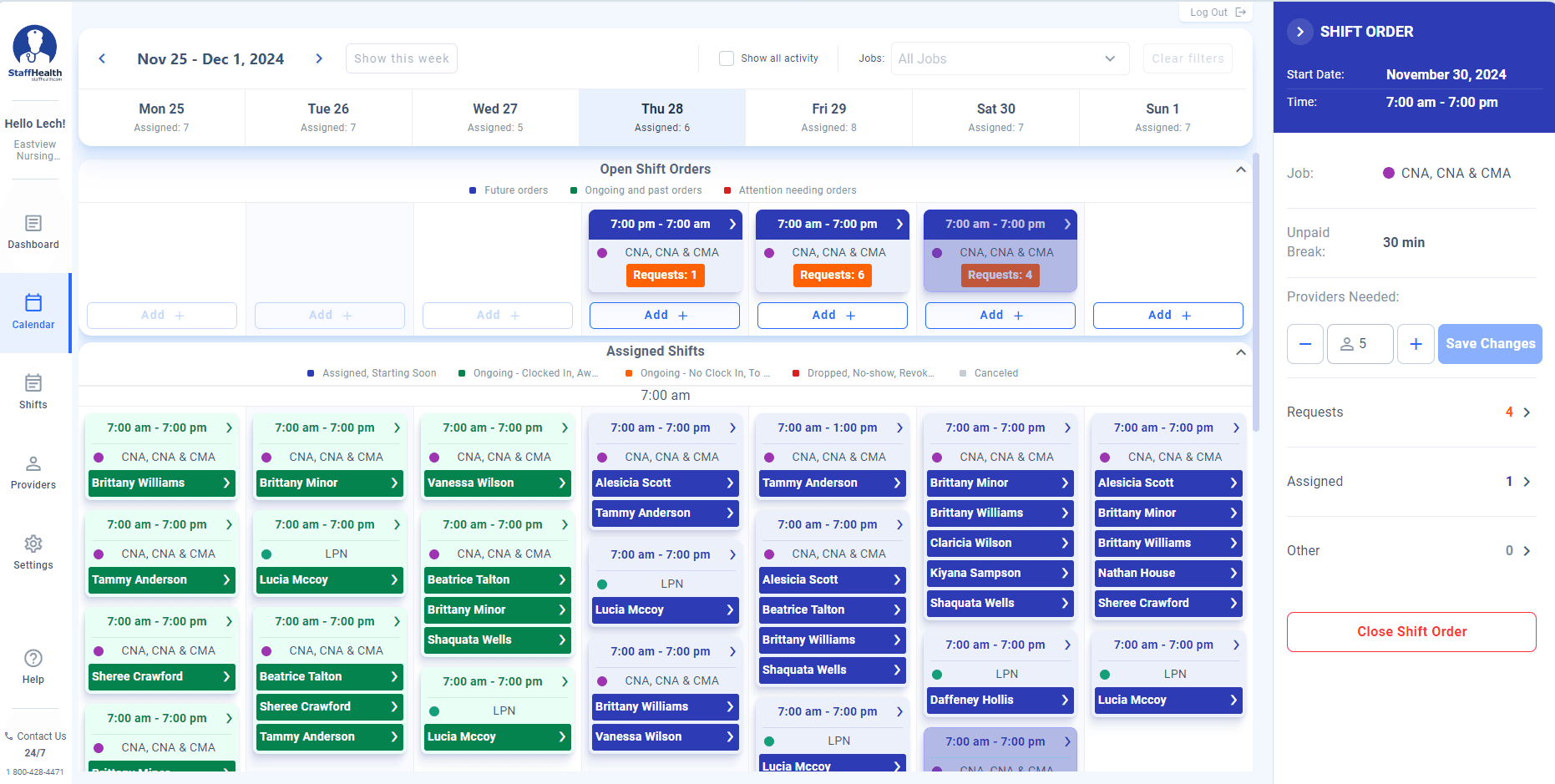
One shift. Two screens.
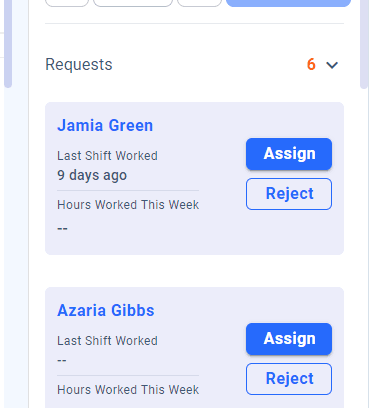
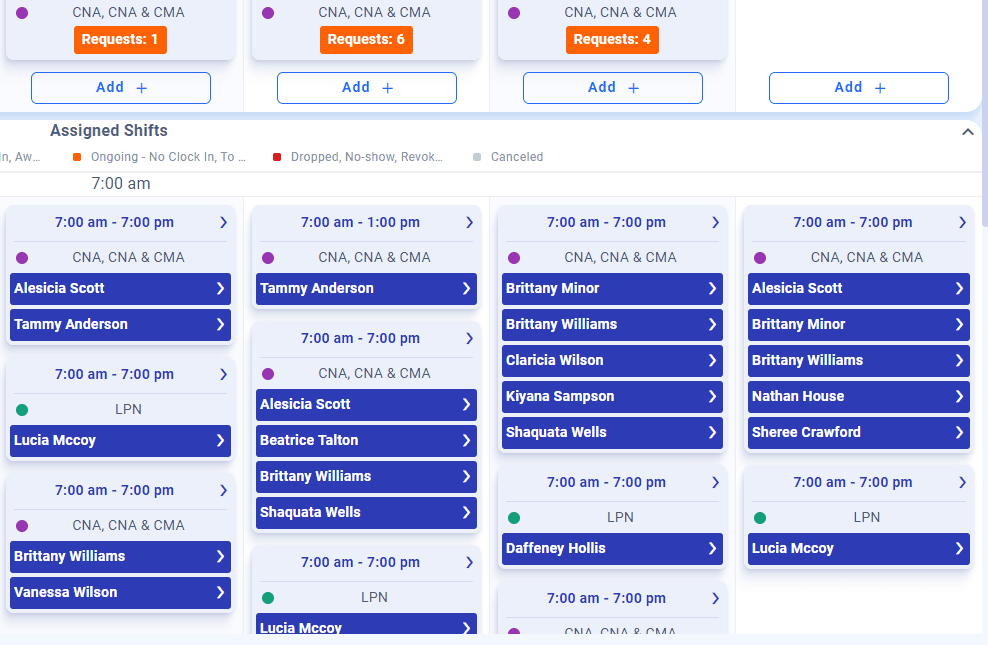
They request. You decide.
StaffHealth does not automatically hand your building to whoever clicks first.
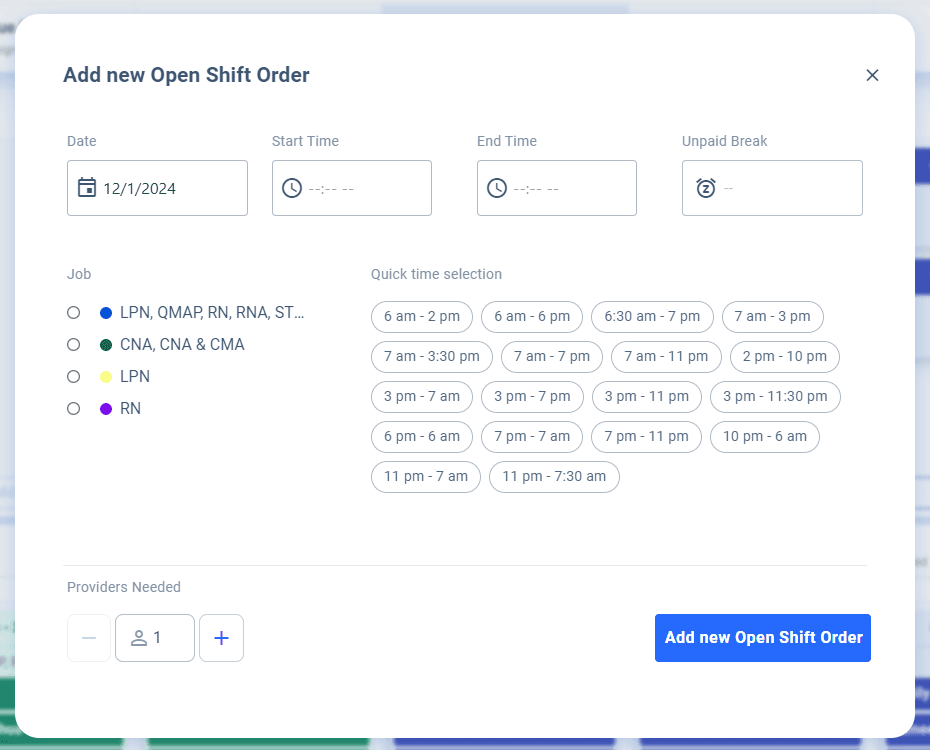
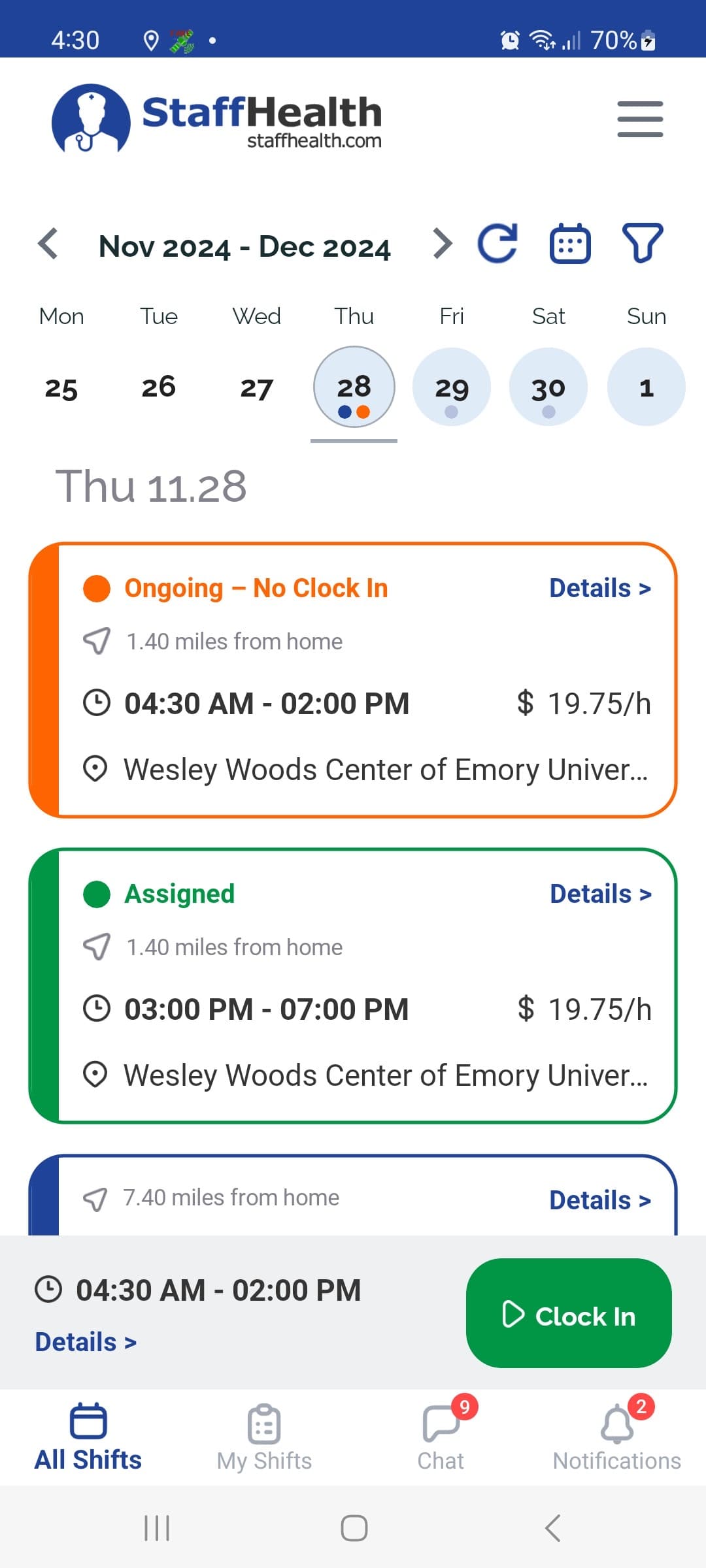
You post it. Nearby clinicians see it.
Want to see the whole thing?
Watch one shift go from open to assigned.
Seven minutes. Real StaffHealth software. No storyboard.
Coverage network
The person who worked well last time shouldn’t disappear into a vendor’s database.
A clinician works successfully at your building.
Your team recognizes the history.
You build familiarity.
The next staffing need does not always have to start from zero.
Build a coverage network that knows your building.
- First shiftA clinician works your building.
- Works wellYour team sees how it went.
- Known providerThey are kept where you can find them again.
- Next shiftYou do not start from zero.
Nearby
Who could actually get there, with role and recent activity.
Favorites
The people you already trust, kept easy to reach.
Credentials
Licences and history, beside the order itself.
WorkWell Incentives
Reliability should earn more.
Getting someone interested in a shift is one thing. Building a marketplace of professionals who value reliability is another.

WorkWell Incentives rewards StaffHealth clinicians as they advance through four tiers, with the opportunity to earn up to $2 more per hour.
- Bronze
- Silver
- Gold
- Diamond
Up to +$2/hr
In the WorkWell example, Maria worked 120 hours during the month, reached Diamond and earned an additional $240.
Example illustrates WorkWell earnings. Tier qualification requirements are not represented here.
An accepted shift only matters if someone shows up.
WorkWell puts a financial incentive behind reliability—not just availability.
Already using an agency?
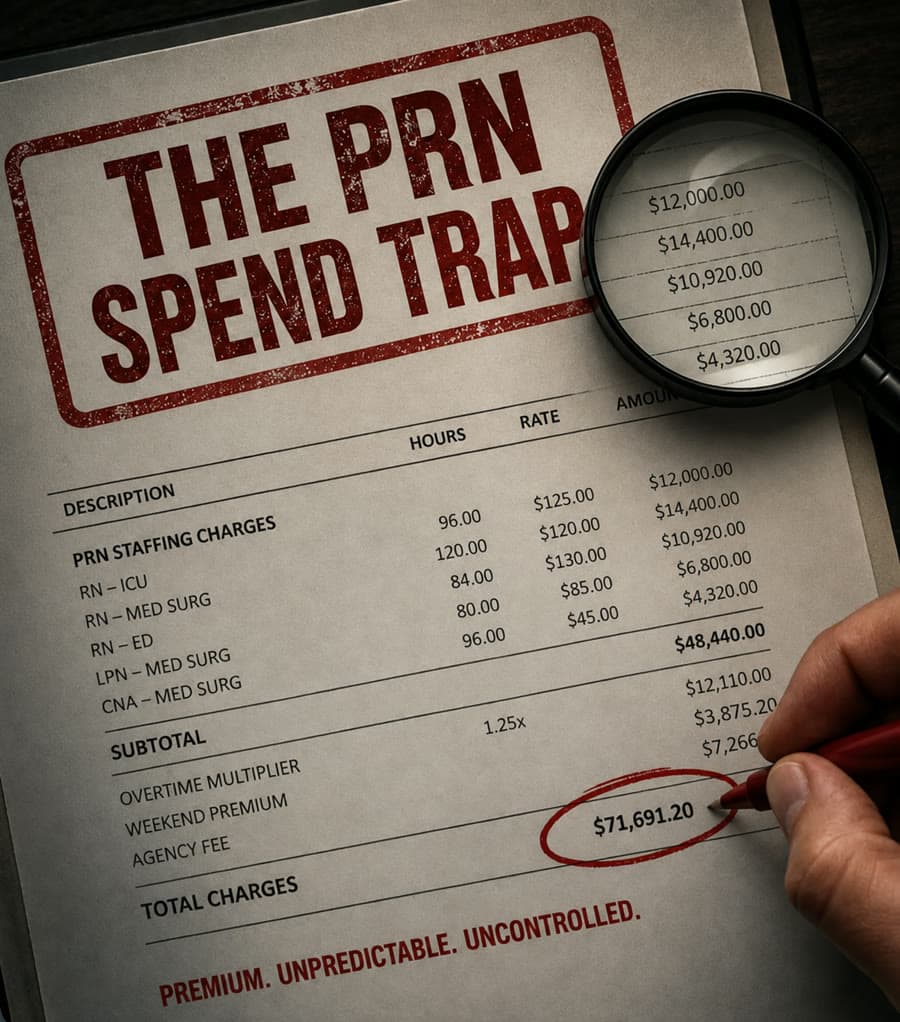
Don’t switch. Audit it first.
You don’t need to believe us.
And you don’t need to cancel anything.
Send StaffHealth one recent temporary-staffing invoice. We’ll break down what you’re actually paying and show you where visible premiums, fees, differentials and rate changes are affecting the effective hourly cost.
Then we’ll compare the numbers with StaffHealth.
What the audit gives you back
- Effective hourly bill rate
- Clinician type
- Hours
- Visible premiums and additional charges
- StaffHealth equivalent
- Estimated monthly variance
- Estimated annual variance
If your current agency is giving you a great deal, the numbers should prove it.
If it isn’t, you’ll know exactly where to look.
No need to replace your current vendor. Just compare the numbers.
What staffing problem are you trying to solve?
Running one building?
I need coverage.
Staffing can go from manageable to shift-to-shift in a single call-off.
Use StaffHealth to post CNA, LPN and RN shifts, review who responds and choose who works your building.
Running multiple buildings?
I need control of agency spend.
Agency problems are rarely distributed evenly.
One building may barely use temporary labor. Another may be quietly driving a disproportionate share of the portfolio’s cost.
StaffHealth helps operators identify where temporary staffing pressure is concentrated and where the biggest financial opportunities may exist.

Portfolio
One bad staffing pattern gets expensive. Twenty buildings make it a strategy problem.
A $5 hourly difference may feel small at one facility.
Across hundreds of hours, multiple buildings and twelve months, it becomes a number ownership cares about.
Illustrative example
$600,000
You don’t need to audit every building first.
Start with one invoice.
If the numbers suggest a larger problem, StaffHealth can help evaluate the broader portfolio.
StaffHealth Intelligence
Don’t just fill the gap. Understand where the pressure is coming from.
StaffHealth uses staffing data and facility-level patterns to help identify where coverage pressure, outside staffing reliance and operational stress may be concentrated.
Today
Open shift
StaffHealth Coverage
Tomorrow
Staffing patterns
StaffHealth Intelligence
- 18
- facilities analyzed
- 7
- showing outside staffing
- 3
- driving most of the exposure
- 2
- showing elevated weekend pressure
- Building AHighOutside staffing + weekend pressure
- Building BMediumHiring pressure + staffing variance
- Building CStableLower outside-staffing exposure
Figures are demonstrative and do not describe a StaffHealth customer.
Coverage solves today’s problem.
Intelligence helps you see where tomorrow’s problem may be forming.
Already have staffing vendors?
Good.
You don’t need to replace them because we say StaffHealth is different.
Compare the economics yourself.
Or show us the invoice.
Audit my current vendorYou don’t have to replace anyone.
Keep your current agency.
Keep your current platform.
Keep every coverage source you already trust.
Add StaffHealth as another option.
Post one shift. Compare who responds. Compare the experience. Compare the bill. Then decide.
Keep
- Current agency
- Current platform
- Existing relationships
Add
- StaffHealth
- Post one shift.
- Compare the experience.
- Compare the bill.
- Decide for yourself.
The next open shift is coming either way.
The question is whether you want another unpredictable staffing bill—or another option.